;)


How to make better use of rack space in your data center
In data centers and server rooms, every inch of space matters. Organizations invest in increasingly powerful servers, and storage arrays, looking for ways to make the most of their existing infrastructure. Yet one aspect of space management is often overlooked: where to store data-bearing media that are no longer installed in active devices.
Where could spare hard drives be kept? What happens to HDDs and SSDs removed from servers while they await reuse or destruction? And is it really necessary to install a separate storage cabinet or allocate additional floor space?
Sometimes, the answer is already inside the server room: unused space in existing 19-inch rack cabinets.
Unused rack space: an opportunity worth exploring
Rack cabinets are essential components of data center infrastructure. They accommodate servers, storage systems, and other IT hardware. However, not every rack is fully utilized. Depending on the installation, some rack units (U) may remain available and could be used for additional purposes without expanding the physical footprint of the server room. At the same time, organizations need secure storage for media that are temporarily or permanently removed from active systems.
Traditional approaches often involve dedicated storage cabinets, safes, or separate storage rooms. While these solutions may be appropriate in many environments, they also require additional space and infrastructure. An alternative is to make better use of existing rack capacity by introducing dedicated storage drawers for data media. This approach allows organizations to combine IT equipment installation and secure media storage within the same infrastructure, provided that rack load limits, airflow requirements, and space organization are properly considered.
Why does secure media storage matter?
A hard drive removed from a server does not stop containing information. Similarly, a magnetic tape taken out of a tape library may still hold valuable or confidential business data. Whether a storage device is intended for reuse, archiving, or destruction, it needs to be handled and stored appropriately.
Keeping data-bearing media in unsecured or poorly organized locations can increase the risk of misplacement, unauthorized access, or handling errors. This is why secure storage is about more than simply finding an empty shelf. Organizations need clearly designated storage locations, appropriate access restrictions, and procedures that help them maintain control over their media assets. Well-organized storage also makes everyday IT operations easier. Administrators can locate media more efficiently, separate different types of storage devices, and reduce the likelihood of mistakes during handling.
A rack cabinet as a secure space for data storage
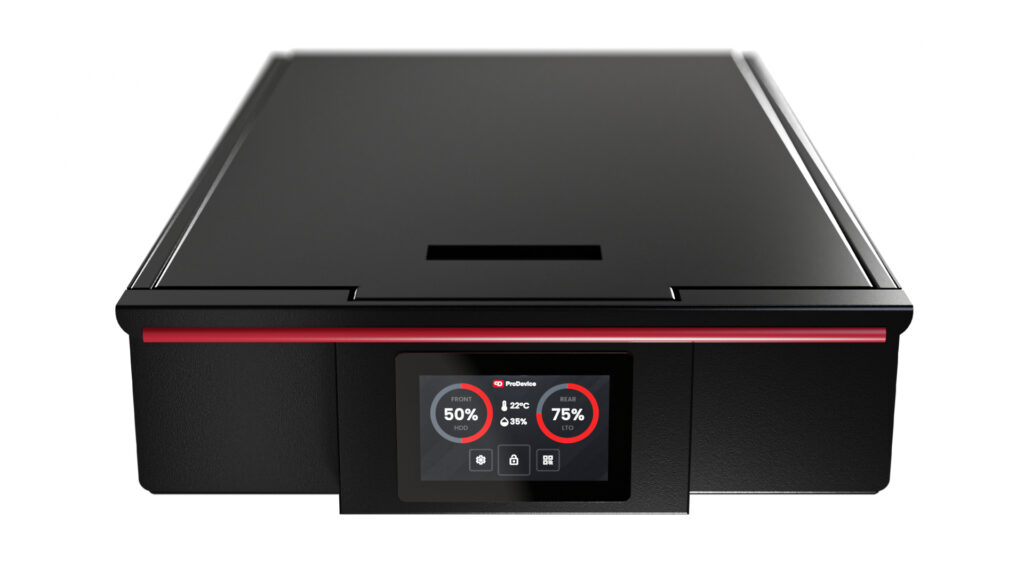
Using existing rack space for media storage can be particularly beneficial when an organization does not need a large, dedicated storage facility. One example is ProDevice MSS (Modular Storage System), a range of rack-mounted storage drawers designed for standard 19-inch cabinets. MSS makes it possible to use part of an existing rack to store HDDs, SSDs, magnetic tapes, and other compatible storage media. Instead of dedicating an entire cabinet to media storage, organizations can install individual drawer modules in available rack units. The system is available in 3U and 4U versions, allowing users to select a configuration based on the available space and the types of media being stored. For example, a single 3U MSS drawer can accommodate up to 108 LTO tapes without cases or 60 horizontally positioned 3.5-inch HDDs. This means that a considerable number of storage devices can be kept within a relatively small amount of rack space.
For organizations searching for a drawer for rack cabinets that combines space efficiency with controlled media storage, a dedicated solution such as MSS can be a practical alternative to standalone storage furniture.
Space optimization can also mean cost optimization
In many organizations, data center floor space is limited, and expanding a server room may involve significant investment. Installing a separate storage cabinet requires more than the physical footprint of the cabinet itself. Additional clearance may also be necessary to ensure safe access and maintenance. When suitable unused rack space is already available, using it for media storage can help reduce the need for additional storage furniture. This can be particularly useful in smaller server rooms, local data centers, technical facilities, and organizations that need to store a limited number of data-bearing devices. A modular approach also offers flexibility. Rather than investing immediately in a large storage system, organizations can start with a single rack-mounted drawer and expand their storage capacity as their needs grow, subject to available rack space. Of course, not every empty rack unit should automatically be filled. Installation decisions must take into account structural load limits, and future infrastructure requirements.
Effective space optimization is not about filling every available rack unit. It is about using existing resources intelligently.
Secure storage is more than a locked drawer
When storage media contain sensitive or confidential information, physical access control and appropriate storage conditions become important considerations. ProDevice MSS offers different security and monitoring features depending on the selected version. The Basic version includes a key-operated lock, while Professional and Ultimate models feature electromagnetic locking mechanisms, touchscreens, and temperature and humidity monitoring. The Ultimate version also allows for monitoring the fill level of the drawer. These options allow organizations to select a storage configuration that matches their operational and security requirements. The internal design is also important. Separating barriers help organize different storage media and limit unwanted movement inside the drawer. An antistatic coating is included across the MSS range.
Together, these features support more structured storage and help IT personnel manage media more efficiently.
Secure media storage as part of chain of custody
Protecting storage media is not only about preventing unauthorized physical access. Organizations also need to know where their media are located, who is responsible for them, and what should happen next. This becomes particularly important when IT equipment is being decommissioned. A hard drive may be removed from a server, placed in temporary storage, transferred to another location, and eventually sent for data erasure or physical destruction. Each stage introduces responsibilities and potential risks. This is where chain of custody becomes relevant.
Chain of custody refers to the documented history of how an asset has been handled, stored, and transferred, including who had responsibility for it at different stages. Dedicated rack storage drawers such as MSS can provide a controlled physical storage point within this process. When combined with appropriate asset identification, inventory management, and documented handling procedures, they can help organizations maintain better oversight of their data-bearing media.
However, a secure drawer alone does not establish a complete chain of custody. Reliable records and procedures are also required to track individual assets and their movements.
Does every organization need a separate media storage cabinet?
Not necessarily. The most suitable storage approach depends on the number and type of media, how frequently they need to be accessed, the required security controls, and the infrastructure already available. Large organizations managing extensive media archives may require dedicated storage facilities and specialized storage systems. However, for smaller quantities of media that need to remain close to IT infrastructure, a rack-mounted storage solution may be more practical. For example, rack drawers can be used to store spare drives, magnetic tapes used in backup operations, or storage devices awaiting further processing. The key is to choose a solution based on actual operational requirements rather than assuming that every storage need requires a separate cabinet or room.
Better use of infrastructure, better control over data media
Efficient data center management is not only about server performance, cooling, or power availability. It also involves making thoughtful decisions about how physical space and IT assets are organized.
Storage media require appropriate protection whether they are installed in active systems, kept in temporary storage, or awaiting destruction.
Using available rack space for secure media storage can help organizations reduce their need for additional storage furniture, improve asset organization, and maintain better physical control over information-bearing devices.
ProDevice MSS demonstrates that space optimization and data security do not have to be separate objectives. Both can be addressed within a well-planned IT environment.
Discover ProDevice MSS and explore how rack-mounted storage drawers can help you make better use of your existing infrastructure.

